What it is
Every recorded call gets a standard transcript after hangup, at no charge. With the RealDialer AI upgrade, calls get a more accurate transcript and an AI call summary.
Where to find it
Recordings > Call recordings > Read full transcript on a call.
Steps
- Open Recordings and find the call.
- Click Read full transcript to open it. Click Hide full transcript to close it.
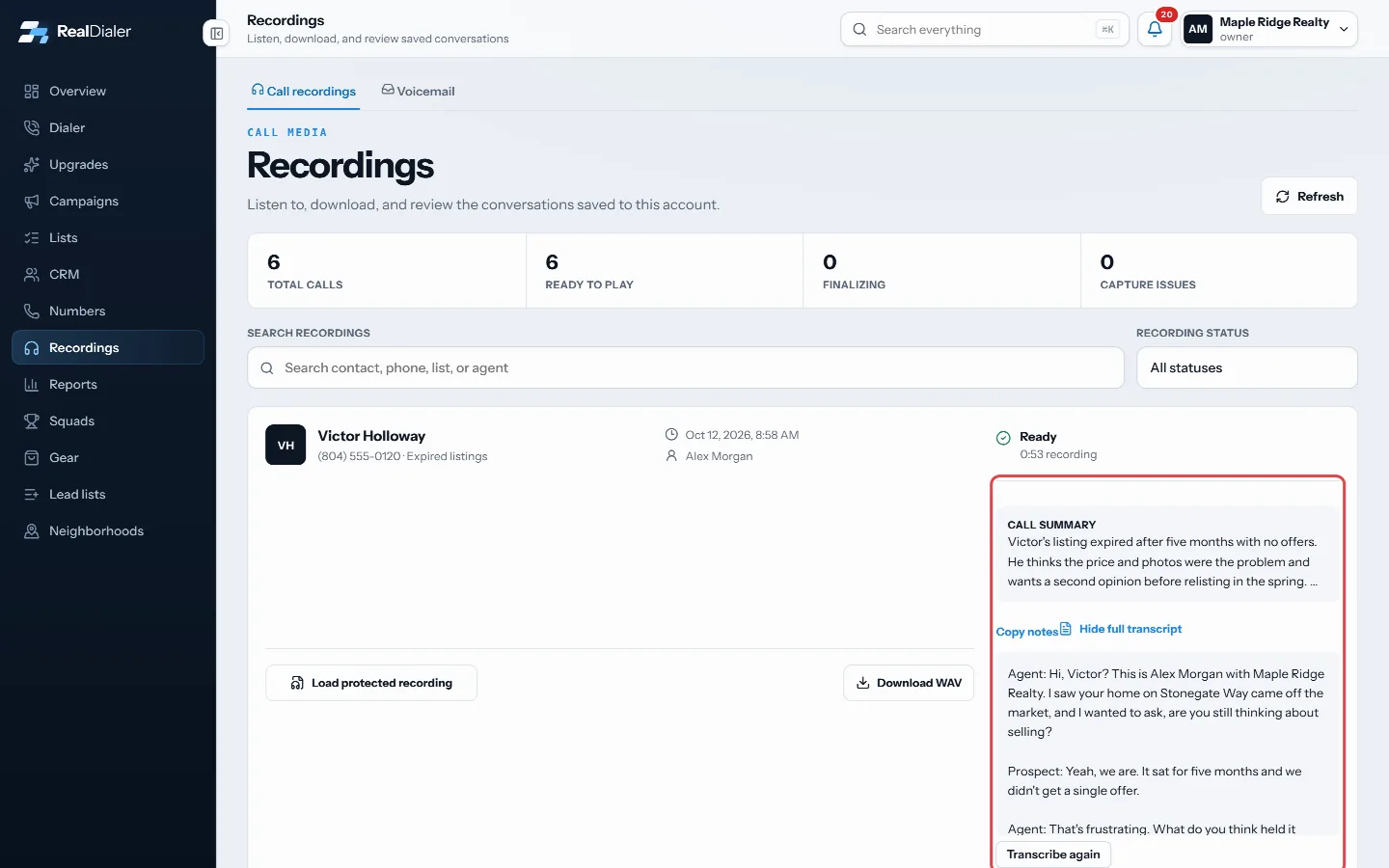
Read full transcript; the summary sits above it - If the call has a summary, read it under Call summary above the transcript.
Good to know
- The button reads Transcript processing while it is being made, Transcript failed if it could not be made, or No transcript if none was requested.
- Transcripts are controlled by Generate private call transcripts in Settings > Recordings.
- Transcripts and AI summaries are kept permanently, even after the audio expires.
- RealDialer AI costs $49.97 per agent a month (RealDialer AI Pro $99.97) and has a 14-day free trial. Without it, a line under each transcript links to Upgrades.
- With RealDialer AI on, the account owner sees Transcribe again on ready calls. It redoes the transcript with the accurate model, and the new one replaces the old one in a minute or two.
- AI call summaries are part of RealDialer AI and are switched on in Settings > Recordings with AI call summaries.
Was this guide helpful?
Thanks. It helps us make these better.
Next in Recordings
Why a call was not recordedRealDialer only records calls when recording is turned on and both your state and the contact's state allow one-party recording, or, if your account owner turneDownload a call recordingAny recording that is ready to play can be downloaded as an audio file, so you can keep a copy or share it with someone outside RealDialer.Find and play a call recordingThe Recordings page lists your recorded calls with the contact, the list, the agent, the date and the recording status. You can play each one in the browser, re
Still stuck? Write to support@realdialer.com, or open Support from inside RealDialer.