What it is
You can let Claude or ChatGPT organize your lists. Give the assistant a personal API key, then ask it things like “tag every Winchester list” or “move everyone on my expired lists who was never called into one list”.
Where to find it
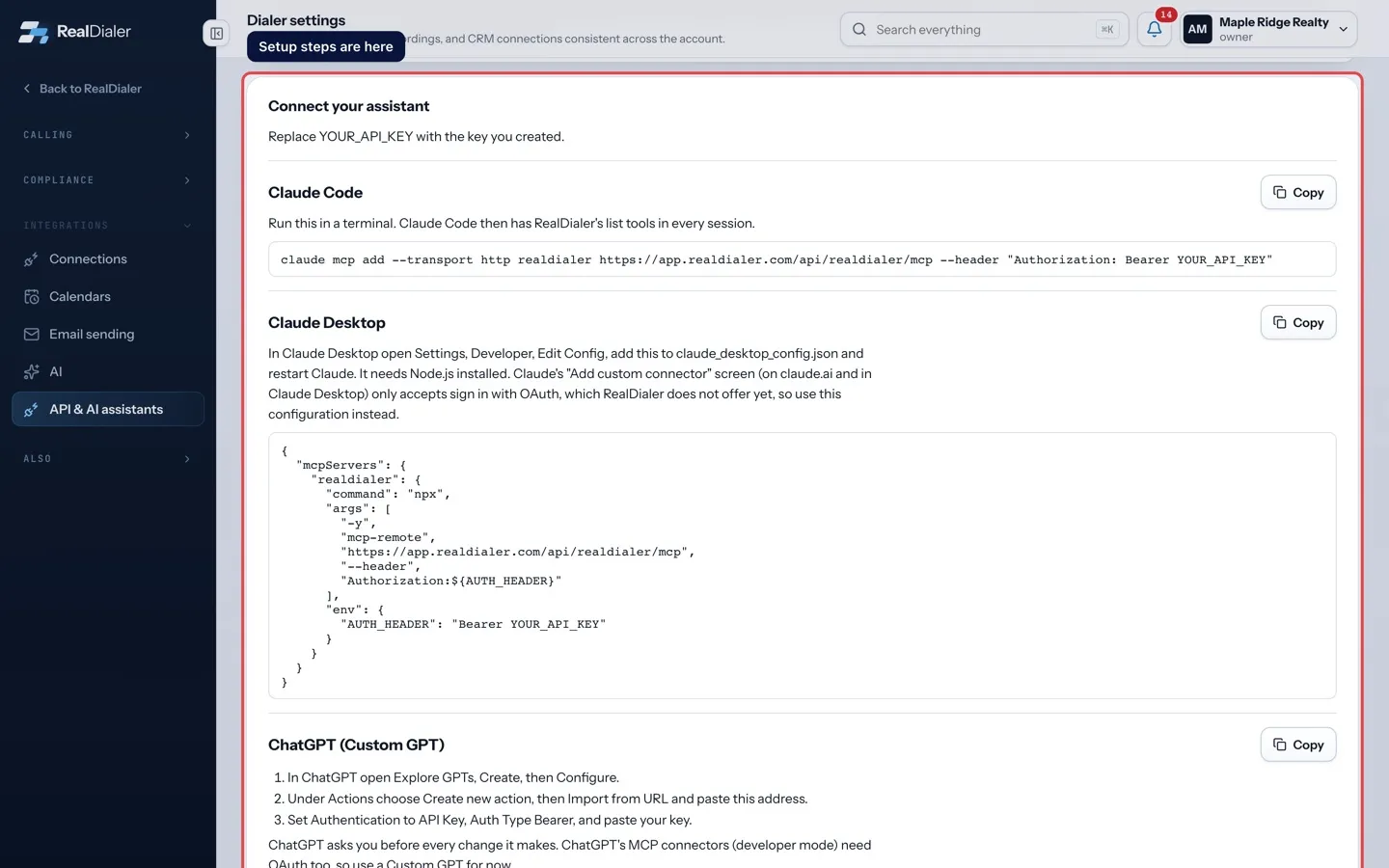
Settings > Integrations > API & AI assistants > Connect your assistant
Steps
- Create a key under Create a key. Turn on Allow changes to lists if the assistant should move or tag things.
- Scroll to Connect your assistant. Right after you create a key, it is already filled in. Otherwise replace YOUR_API_KEY with your key.
- For Claude Code, copy the command and run it in a terminal.
- For Claude Desktop, open Settings, Developer, Edit Config, paste the configuration, and restart Claude. It needs Node.js installed.
- For ChatGPT (Custom GPT), open Explore GPTs, Create, then Configure. Under Actions choose Create new action, then Import from URL and paste the address. Set Authentication to API Key, Auth Type Bearer, and paste your key.
- For Any other MCP client, copy the MCP server address and send your key as a Bearer token.
Good to know
- Claude’s “Add custom connector” screen and ChatGPT’s MCP connectors only accept OAuth sign in, which RealDialer does not offer yet. Use the setups above instead.
- ChatGPT asks you before every change it makes.
- The assistant can never dial, change do not call status, delete contacts or play recordings.
- To stop the assistant, pause or revoke its key under Your keys.
Was this guide helpful?
Thanks. It helps us make these better.
Next in Integrations
Connect Follow Up BossRealDialer has a two way sync with Follow Up Boss. Your calls, notes, callbacks and appointments land in Follow Up Boss, and the people in Follow Up Boss can laConnect RealDialer to ZapierWith Zapier you can send call outcomes, new leads, appointments and due callbacks to thousands of other apps the moment they happen. Zaps can also add, find or Connect your calendarConnect the calendar you already use so RealDialer knows when you are busy and does not book over it. Appointments you set in RealDialer are written to the cale
Still stuck? Write to support@realdialer.com, or open Support from inside RealDialer.