What it is
Lines are how many numbers the dialer rings at once on a predictive campaign. The first person to answer is connected to you and the other lines are released. More lines means more people reached per hour.
Where to find it
Dialer > Preferences > Choose your lines. During a session: Session controls > Lines.
Steps
- Open Dialer and go to step 3.
- Pick 1, 3, 5, 10 or 15 lines. The screen starts on the most lines your plan and your caller IDs allow.
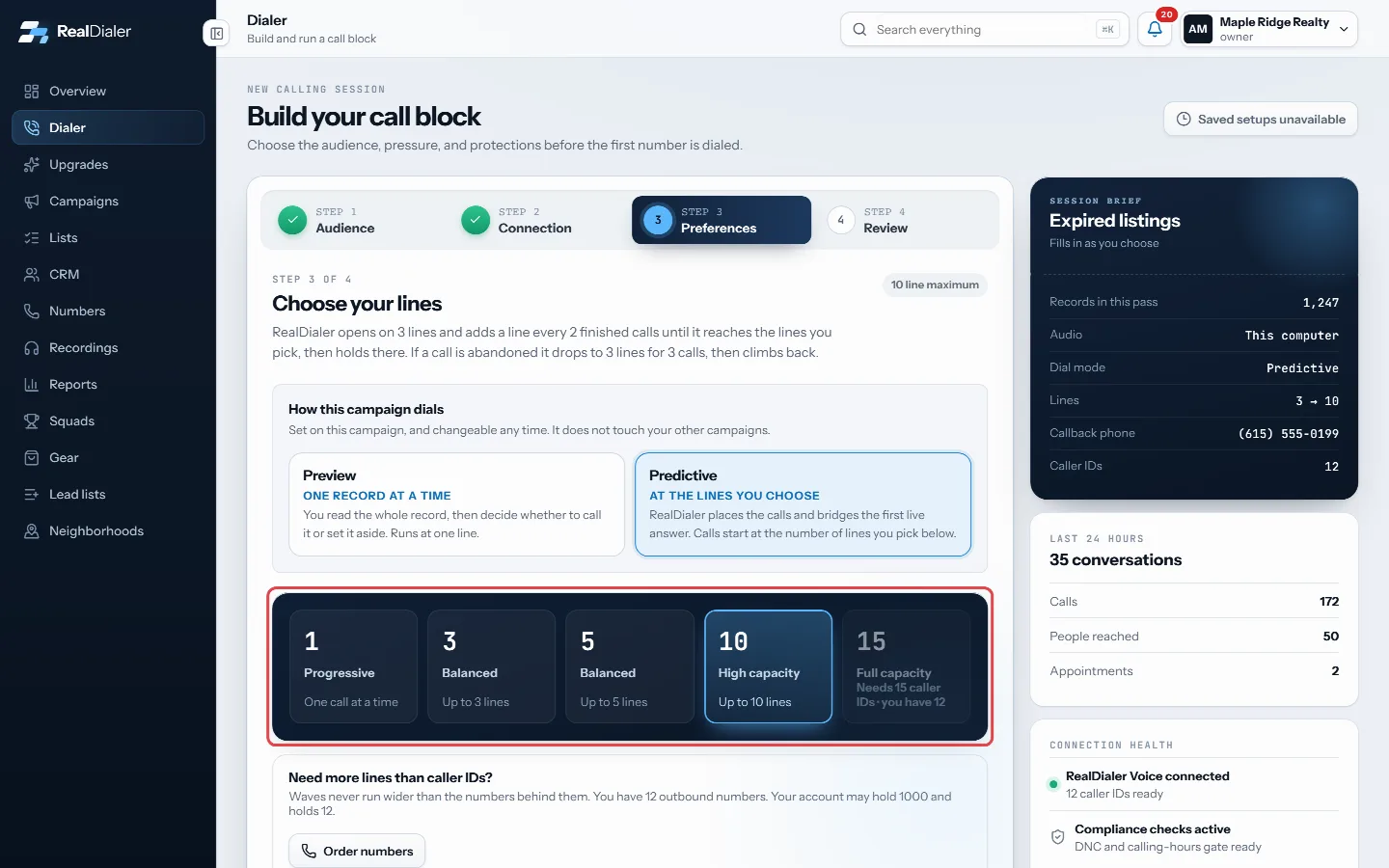
Step 3 Preferences: pick 1, 3, 5, 10 or 15 lines. A count needs as many caller IDs. - Continue to review and start the session.
- To change lines during a session, use the line buttons under Session controls on the right. The next wave uses the new count.
How the dialer uses your lines
- A session opens on 3 lines (or fewer, if you picked fewer) and adds one more line every 2 finished calls until it reaches the lines you picked. The Lines card shows this as Ramping to your line count, with a meter.
- Calls start a couple of seconds apart, not all at once, so two people are less likely to answer at the same moment.
- If two people answer at once, the second one hears your live-answer message. That is an abandoned call. The dialer then drops to 3 lines for the next 3 finished calls and climbs back the same way.
- The Lines card on the left of the live screen shows every line by number and what it is doing: Dialing, Ringing, Live, Leaving VM, or Ready and Idle for lines not in use yet.
Good to know
- Your plan sets the ceiling: Foundation 3 lines, Operator 5, Command 15. Higher choices say which plan they need.
- You can never dial more lines than you have caller IDs. A locked choice shows Needs X caller IDs. Use Order numbers on the same step to ask for more.
- More than one line needs a live-answer message. If you have not recorded one, RealDialer makes a default one for you.
- Federal rules limit abandoned calls to 3 percent of answered calls per campaign over 30 days. Staying within it is your responsibility. The step 3 header shows each campaign’s rate.
- An account owner or admin can turn on the Abandon throttle in Dialer settings, Dialer rules, so a campaign over 3 percent opens narrow and widens only as the calls allow.
- A preview campaign always runs at one line.
Was this guide helpful?
Thanks. It helps us make these better.
Next in Dialer
Connect your audio through the browserStep 2 of the Dialer connects your own voice to the session. You talk through the browser on this computer with a headset, so no phone line or PIN is needed. ThFill in a lead sheet during a callA lead sheet is a short form your manager writes, filled in while the person is still on the phone. The answers file against the contact and the call, and land Find your way around the live dialerOnce you start your session, the Dialer becomes the live call screen. It has three columns: your lines on the left, the person you are talking to in the middle,
Still stuck? Write to support@realdialer.com, or open Support from inside RealDialer.