What it is
When someone calls one of your numbers, RealDialer rings your browser and your cell at the same time. A full screen Incoming call takeover shows who is calling, on any page of the app. Answer in the browser with your headset, or pick up your cell and press 1. Whichever you do first takes the call, and the other stops ringing.
Where to find it
Any page in the app, while it is open. Choose how calls ring you in Dialer settings > Incoming calls.
Steps
- Keep RealDialer open in a browser tab, and have your cell verified in Dialer setup.
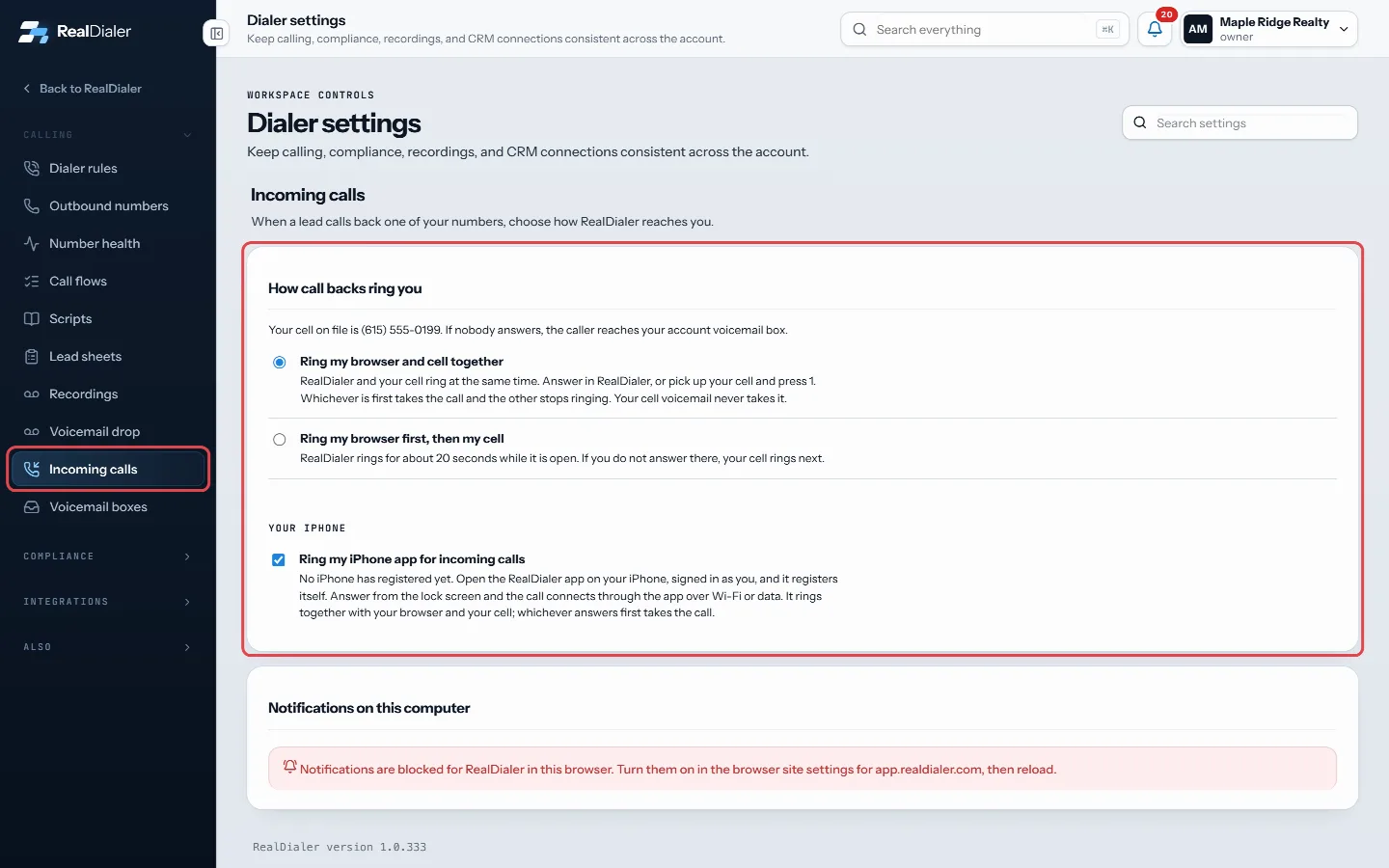
Dialer settings > Incoming calls: choose whether your browser and cell ring together or the browser rings first. - When a call comes in, the Incoming call screen shows the caller, the number they called and how long it has been ringing.
- To take it in the browser, press Answer. Allow the microphone if your browser asks. A bar then shows On the call with the caller.
- To take it on your cell, pick up. You hear who is calling. Press 1 to take the call.
- Press Send to voicemail if you cannot talk. The caller goes to your voicemail and your cell stops ringing.
- Press Open contact to see their record, and Hang up when you are done.
Good to know
- The browser and cell ring together for about 25 seconds. If neither answers, the caller reaches your account voicemail box.
- Your cell’s own voicemail never takes the call. It only connects when you press 1.
- The X hides the full screen. A strip with Answer stays at the top while it rings.
- If the browser blocks the ring sound, press Click to enable sound once.
- Prefer the old way? In Dialer settings > Incoming calls, pick Ring my browser first, then my cell. RealDialer then rings for about 20 seconds before your cell rings.
- You can also have calls ring the RealDialer iPhone app, on the same settings screen.
- It only rings in the browser if your browser is not already on a call. If it is, only your cell rings.
- Calls for a teammate show as a banner that says whose browser or phone is ringing.
- Every inbound call is listed under Inbound calls on the Numbers screen, so a missed one is easy to call back.
Was this guide helpful?
Thanks. It helps us make these better.
Next in Dialer
Book an appointment during a callBook appointment shows your real free time for the next two weeks while the person is still on the phone. You pick a time, it is held for you, and you book it bCall a contact with RealDialer from the CRMCall with RealDialer places one call to one contact straight from the CRM, through your RealDialer caller ID and audio. A small call bar stays on the page you aCall my missed callsCall my missed calls puts everyone who called one of your numbers this week and was not answered onto a list named Missed calls, then opens the Dialer on it. Yo
Still stuck? Write to support@realdialer.com, or open Support from inside RealDialer.