What it is
A small WordPress plugin that shows your RealDialer lead form on any page with a shortcode or a block. It shows the form you designed in RealDialer, so a change you save in RealDialer shows on your site on the next page load. It has no settings and stores nothing in WordPress.
Where to find it
CRM > Lead Intake, press Get the form on an intake card, then look for Add to WordPress. It is also on the Add to your site tab of Design form.
Steps
- Press Download the RealDialer plugin. You get a file called realdialer-lead-form.zip. Do not unzip it.
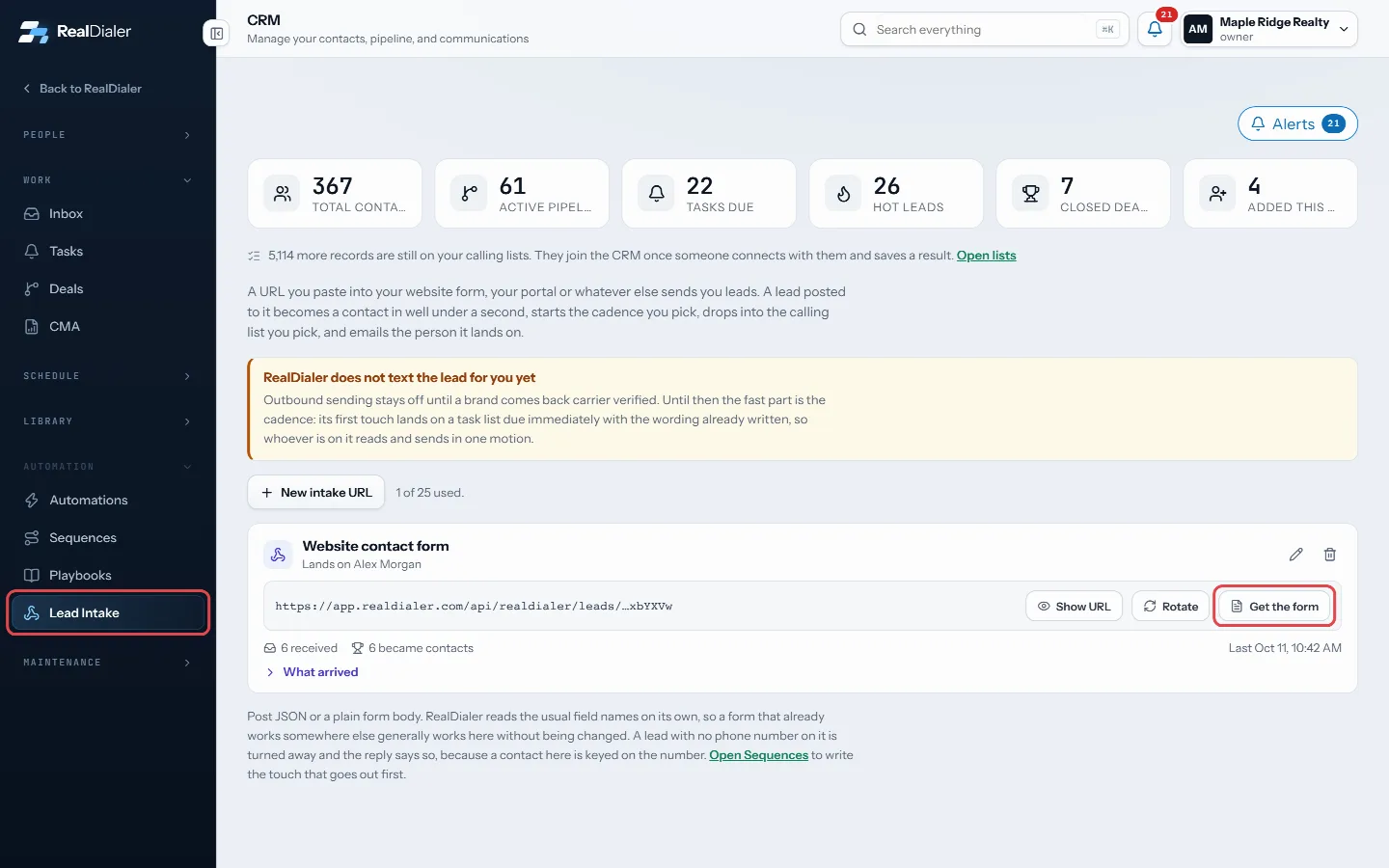
In CRM > Lead Intake, press Get the form on the intake card to find Add to WordPress - In WordPress, go to Plugins > Add New > Upload Plugin, choose the file and press Install Now, then Activate.
- Copy the Shortcode from RealDialer and paste it into any page or post.
- Or, in the block editor, add the RealDialer Form block and paste the Form ID.
- Publish the page and open it to check the form.
Good to know
- The form sizes itself to fit. To change the starting height, add height=”900″ inside the shortcode brackets, after the id, or set it in the block’s sidebar.
- Ad clicks and UTM tags on the page are saved with each lead, the same as the embed code.
- If you set Only on these websites in Design form, add your WordPress site’s address there, or leave the list empty.
- A transparent form shows your theme’s background behind it.
- New form address in RealDialer stops the old Form ID. Paste the new shortcode or Form ID after you make one.
- You can use the plain Embed code in a Custom HTML block instead of the plugin if you prefer.
Was this guide helpful?
Thanks. It helps us make these better.
Next in CRM
Read and reply in the InboxThe Inbox holds every text and email written to your account, one conversation per contact, newest first.Search everything from the top barThe search box in the top bar looks across your whole account: contacts, call transcripts, call notes, notes, texts and email, tasks, callbacks, appointments, dSee a contact’s call and activity historyThe contact record keeps one dated timeline of everything that happened with a person: calls and their results, voicemails they left, texts and emails, notes, f
Still stuck? Write to support@realdialer.com, or open Support from inside RealDialer.